
README.md 3.0 KB
#Minitel library for Arduino
This library provides a way to create screens for the Minitel without having to dig into the complexity of the system.
##Schematic A DIN 45º plug is required to plug the Arduino to the Minitel
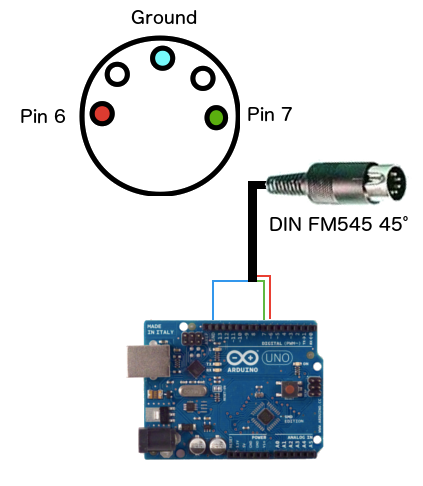
##External libraries This library is using SoftwareSerial, please install it prior to compiling any Minitel sketch.
##Constructor
Default constructor, using Arduino PINs 6 and 7 for TX/RX
#include <SoftwareSerial.h>
#include <Minitel.h>
Minitel minitel;

void setup() {
}
...
Custom constructor using other Arduino PINs for TX/RX
#include <SoftwareSerial.h>
#include <Minitel.h>
Minitel minitel(10, 11);

void setup() {
}
...
##Graphic and Text modes
Here is how you can switch between text and graphic mode
minitel.graphicMode();
minitel.textMode();
Cursor positionning
Moving the cursor to a certain position
Move the cursor to a certain location
minitel.void moveCursorTo(HOME);
Other possible positions are :
Cursor related
- HOME : beginning of the current line
- LINE_END : end of the current line
Screen related
- TOP_LEFT : top left of the screen
- TOP_RIGHT : top right of the screen
- BOTTOM_LEFT : bottom left of the screen
- BOTTOM_RIGHT : bottom right of the screen
- CENTER : center of the screen
Moving the cursor to an XY position
Move the cursor to a given positioni (x,y), anywhere in the screen x has a max of 40 y has a max of 24
minitel.moveCursorTo(10, 2);
Moving the cursor in a certain direction
Move the cursor based on its current position You can specify how many times you the cursor should be moved this direction
minitel.moveCursor(UP);
minitel.moveCursor(RIGHT, 10);
Available directions :
- LEFT
- RIGHT
- DOWN
- UP
Show/hide the cursor
You can show (white square) or hide the cursor
minitel.cursor();
minitel.noCursor();
Clear the screen
Clear all characters and set the cursor position at the top left
minitel.clearScreen();
Sound
You can trigger a bip by calling this fucntion with a duration (in milliseconds)
minitel.bip(1000);
Colors
You can change the text or graphics color and background color
minitel.bgColor(WHITE);
minitel.textColor(BLUE);
Available colors are (grayscale on most Minitels)
- BLACK
- RED
- GREEN
- YELLOW
- MAGENTA
- BLUE
- CYAN
- WHITE
You can reset colors to their default values (white characters, black background) using
minitel.useDefaultColors();
Display text
Single characters
minitel.
Constants :
//text(String s, int orientation) HORIZONTAL VERTICAL
// charSize() SIZE_NORMAL SIZE_DOUBLE_HEIGHT SIZE_DOUBLE_WIDTH SIZE_DOUBLE
// Colors // bgColor() // textColor
// specialChar() SPE_CHAR_BOOK SPE_CHAR_PARAGRAPH SPE_CHAR_ARROW_LEFT SPE_CHAR_ARROW_UP SPE_CHAR_ARROW_RIGHT SPE_CHAR_ARROW_DOWN SPE_CHAR_CIRCLE SPE_CHAR_MINUS_PLUS SPE_CHAR_1_4 SPE_CHAR_1_2 SPE_CHAR_3_4 SPE_CHAR_UPPER_OE SPE_CHAR_LOWER_OE SPE_CHAR_BETA